

On this page
How to play Spider Solitaire
To win Spider Solitaire, build eight runs of one suit in order from King down to Ace; every finished run leaves the table by itself.
The setup
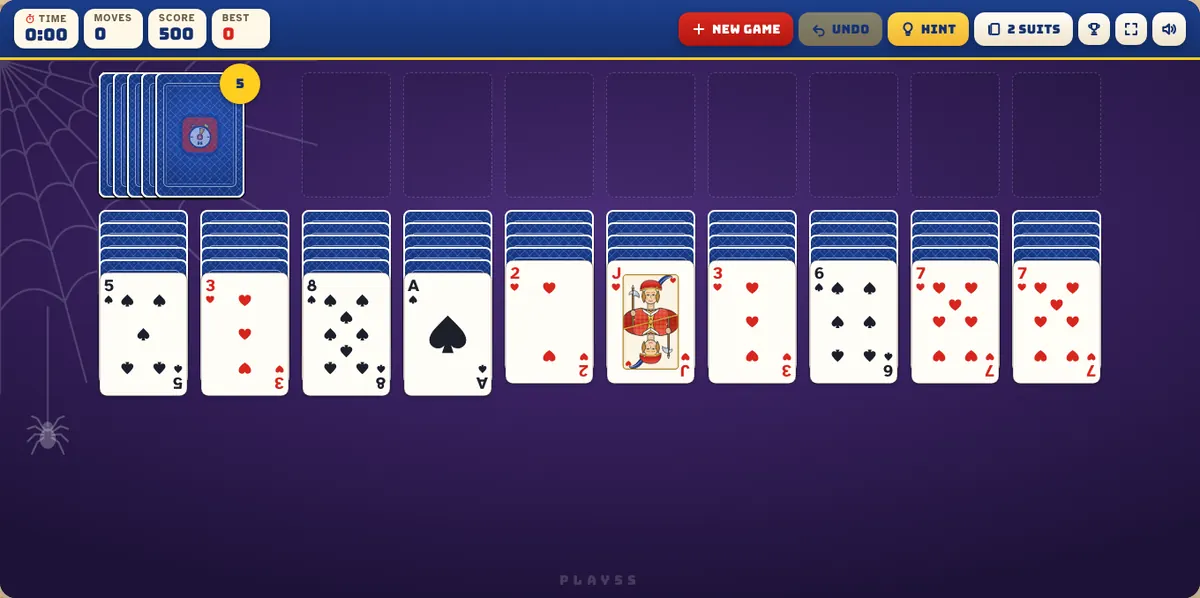
The game uses two decks, 104 cards. 54 of them are dealt into ten columns: the first four columns get six cards and the other six get five. Only the top card of each column is face up.
The other 50 cards form the stock in the top left corner, which you deal later in five rounds of ten cards. The eight empty spaces along the top are where finished runs go.
 Zoom in
Moving cards
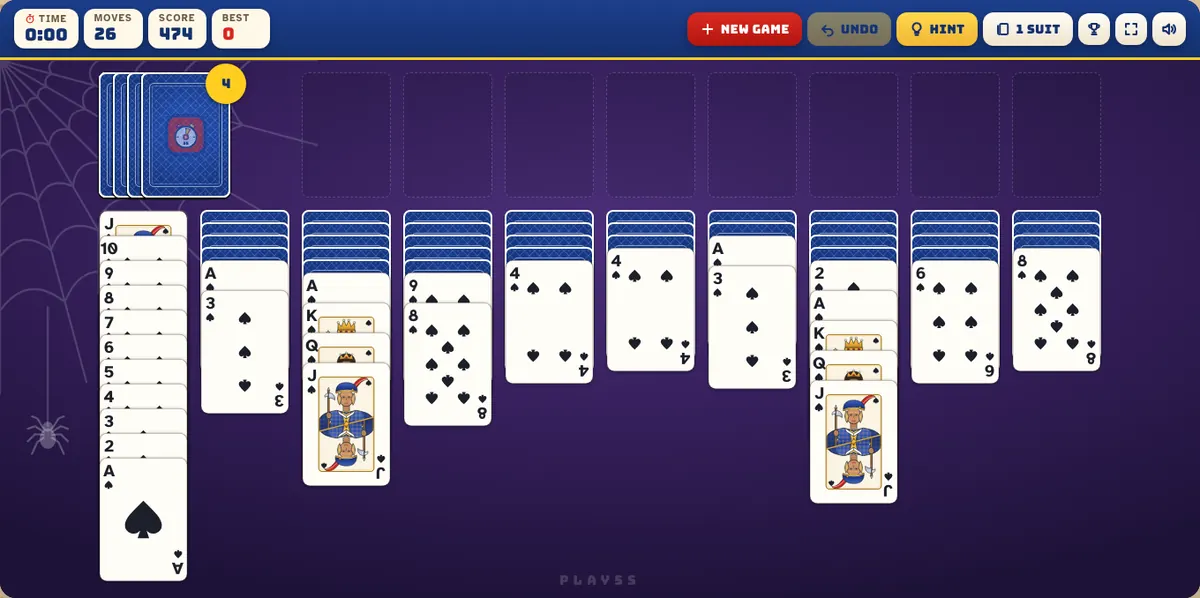
You can place a card on any card that is exactly one rank higher, whatever its suit: a 6 can go on a 7 of any suit. Moving a whole stack is stricter. You can only pick up cards that are in order and all of the same suit, so a 7, 6 and 5 of spades move together, but a 7 of spades with a 6 of hearts on it does not.
When you move the last face-up card off a column, the card under it turns face up. Any card, or any run, can go into an empty column.
 Zoom in
Finishing a run
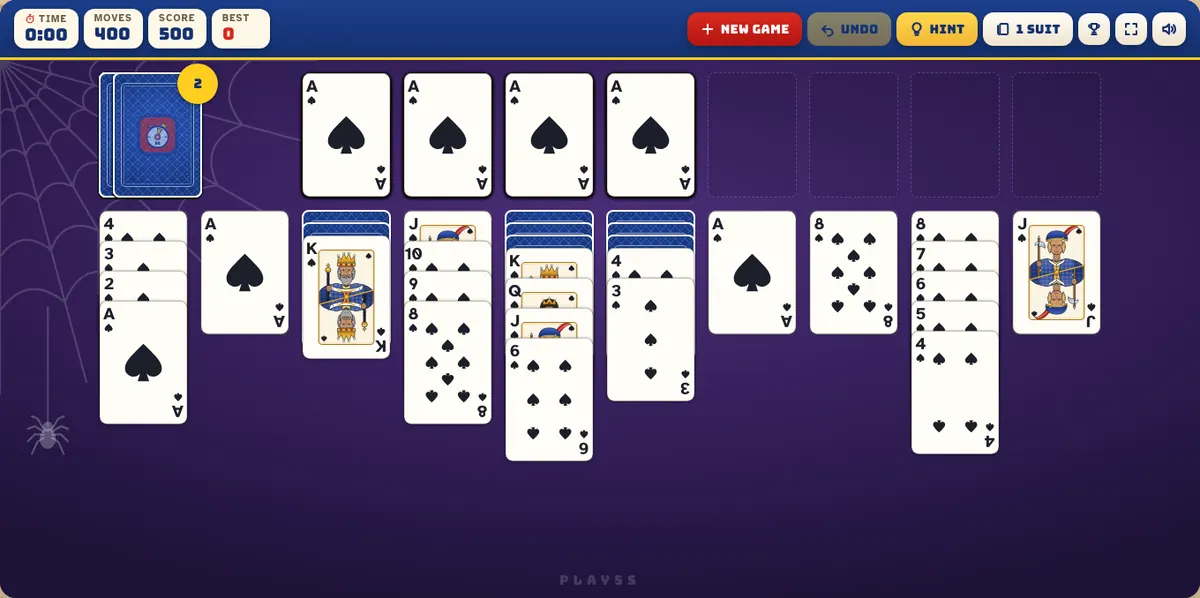
When you build a full run of one suit from King down to Ace, those 13 cards leave the table and fill the next space in the top row. The card that was under the run turns face up. Each finished run is worth 100 points.
 Zoom in
How a game ends
You win when all eight runs are finished and the table is clear. There is no game over screen: when nothing can move and the stock is used up, Hint tells you there are no moves left, and you can take moves back with Undo or start a new game.
Playing with 1, 2 or 4 suits
Spider Solitaire gets harder as you add suits: 1 suit is the easiest, 2 suits is the middle level and 4 suits is the hardest.
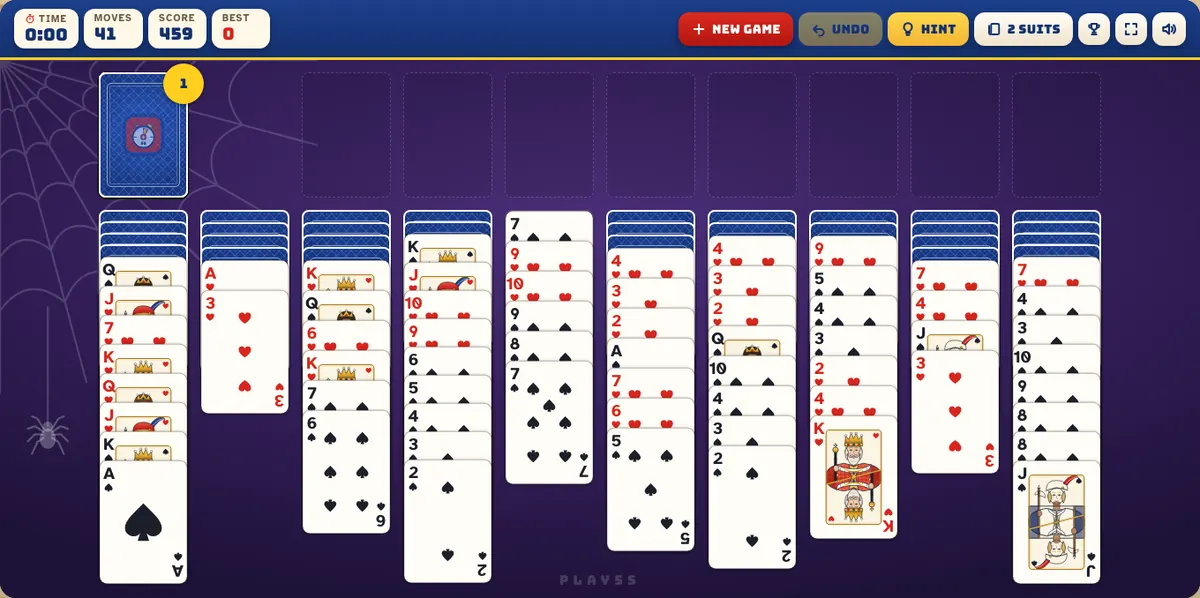
The number of suits does not change the rules, only the cards. In the Play5s version, 1 suit uses only spades, 2 suits uses spades and hearts, and 4 suits uses all four suits, 26 cards of each. With 1 suit, every card you place on the right rank also builds a run.
With 2 or 4 suits you can still stack a card on any card one rank higher, but only a group of one suit moves together, so mixed stacks get stuck in place. That is why 4 suits asks for careful planning, while 1 suit is a good way to get comfortable with the game first.
 Zoom in
You choose the number of suits on the start screen. The suits button above the table switches between 1, 2 and 4 suits and deals a new game right away, so it does not keep the game you were playing.
Dealing from the stock
When you run out of moves, tap the stock to deal one face-up card onto every column; you get five deals per game, and you cannot deal while any column is empty.
Each deal uses ten cards, one for each column, and the stock shows how many deals are left in a small yellow badge. A deal costs one point, like any other move. Dealing can finish a run too, if the card you add completes one.
In the Play5s version, as in the standard game, a deal needs every column to hold at least one card. A variant called Relaxed Spider does not ask for that and lets you deal while a column is empty; the Play5s version does not. If you tap the stock with an empty column, the empty spaces light up to show what to fill first. Hint points at them too when no other move helps.
Because a deal covers every column, make sure no useful move is left on the table before you deal.
How scoring works in Spider Solitaire
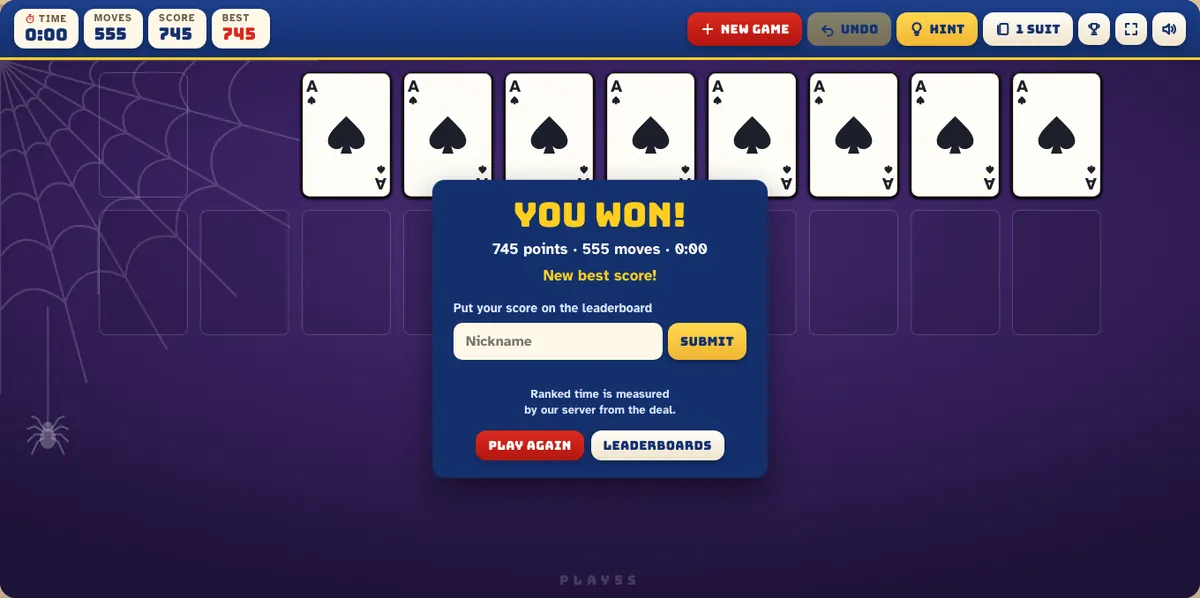
In Spider Solitaire on Play5s, a game starts at 500 points, every move costs 1 point and every finished run gives 100 points.
Dealing from the stock counts as a move, and so does each Undo. An Undo puts the cards back, but the point for the move you took back is not returned, and the Undo itself costs one more point, so a move you take back costs 2 points in all. There is no time bonus: the clock is only there for you. A win scores 1,300 points minus the number on the Moves counter, which is 500, plus 800 for eight runs, minus one point per move and per Undo. The Moves counter counts every move you made and every Undo, so it never goes down. In the Play5s version the score is never shown below zero.
The 500 start, the point per move and Undo, and the 100 points per finished run are the scoring of the Windows version of Spider. In the Play5s version, when you win, your score becomes your best score for that number of suits if it beats the old one. Best scores are kept separately for 1, 2 and 4 suits, and only for won games.
 Zoom in
Daily Deal and leaderboards
The Daily Deal is one 1-suit game that every player gets on the same day, and the leaderboards rank won games by score.
A new Daily Deal starts at midnight New York time. Everyone plays the same cards, so the Daily Deal board compares players on one deal. A solver found a way to win every Daily Deal; it could see the face-down cards, which you cannot, so not every player will manage it. You need an internet connection, because our server hands out the deal.
Only won games go on a board, ranked by score; a tie goes to fewer seconds, then to whoever posted first. Each connection gets one ranked Daily Deal result per day, and later wins that day are practice. Each number of suits (1, 2 and 4) also has an all-time board where a nickname keeps its best result, and every board shows the top 20.
How a score gets on the board
When you win, type a nickname of 2 to 12 characters (offensive names are refused, and there is no account) and press Submit. Only then are your moves, Undos and nickname sent. Our server plays the game again move by move, Undos included, and works out the score itself, so the board shows the score you saw. The time is measured by our server from the moment it dealt the game. No online leaderboard can promise that nobody cheats, and this one does not.
Tips to win more Spider Solitaire games
Two habits help most in Spider: turn face-down cards over as early as you can, and open an empty column to give yourself room to move.
- Favor the move that turns over a face-down card, especially in a column with only a few hidden cards left.
- Build runs of one suit whenever you can, so your stacks stay easy to move.
- Think twice before putting a card on a different suit: that stack can no longer move as one piece.
- Try to make your first empty column early, and treat it as a place to park cards for a moment.
- Do not fill an empty column with a card you have no plan for.
- Make sure no useful move is left before you deal, because a deal covers all ten columns.
- Use Hint when you are stuck. Undo is unlimited, but every use costs points, so try an idea in your head first.
Spider Solitaire controls
Tap a card to send it to the best place it can go, or drag it to the exact column you want.
A tap first looks for a card of the same suit that the card can go on, then for any card one rank higher, and only then for an empty column. If a card cannot move, it gives a small shake. Tapping a card in the middle of a column picks up that card and everything on top of it, as long as they form a run of one suit.
Dragging works with a mouse, a finger or a stylus. Drop the card or run over the column you want; if the move is not allowed, the cards slide back.
Buttons
Undo takes back your last move, and you can press it again to go further back. It counts as a move, so it costs a point, and the point of the move you took back is not returned. The Undo history lasts while the page is open. Hint highlights a useful move, the stock when dealing is best, or an empty column that needs filling; if only plain moves are left it says so, and it only says there are no moves left when there really are none. New game and the suits button ask first when a game is in progress. The full screen button hides everything except the table; press it again, or Esc, to come back. The cup button opens the leaderboards. The bar above the cards shows your time, moves, score and best score. The gear (Settings) button opens a panel with two switches: sound effects for dealing, moving and finishing a run (on at first) and a quiet background music loop (off until you turn it on); both choices are remembered for every Play5s game. The same panel lets you pick the language of the game’s own words, and the M key mutes or unmutes the sound effects.
Your game is saved in this browser after every move, so you can close the page and use Continue on the start screen. Clearing your browser data removes the saved game and your best scores.
Keyboard shortcuts
On a computer you can play without the mouse. Tab moves through the table in order: the stock first, then the cards you can pick up, from column 1 to column 10 and from the top of each column to the bottom. The arrow keys move between those cards too.
Press Enter or Space on a card to pick it up, together with the cards on top of it. Then press the left or right arrow key to step through the columns it can go to, and press Enter to put it down. Pressing Enter again right away, without choosing a column, sends the cards to the best spot, like a tap. Escape puts them back.
- Enter or Space: pick up a card, then put it down
- Left and right arrows: choose the column for a picked-up card
- Escape: put the cards back
- D: deal from the stock
- U or Ctrl+Z: undo
- H: show a hint
- N: start a new game (asks first if a game is in progress)
- F: full screen on or off
- M: sound effects on or off
Spider Solitaire terms
Spider uses a few words for the parts of the table, and most of them are the same in other solitaire games.
- Tableau: the ten columns where the game is played.
- Stock: the face-down cards left after the first deal, 50 cards in five deals of ten.
- Deal: turning ten cards from the stock onto the ten columns, one each.
- Run: cards in order, one rank apart and all of one suit, which can be moved together.
- Finished run: a run from King to Ace that leaves the table, 100 points each.
- Empty column: a column with no cards, where any card or run can go.
Where Spider Solitaire comes from
Spider Solitaire was first included with Windows 98 in the Microsoft Plus! 98 pack, then added to Windows Me and Windows XP, and it became popular after that.
The Windows version came with three levels, 1, 2 or 4 suits, the same choice you have here. Related games include Spiderette, which uses a single pack in a Klondike-style layout of seven columns, and Relaxed Spider, which lets you deal while a column is empty. Sources: the Wikipedia articles Spider (solitaire) and Microsoft Spider Solitaire, and Microsoft’s Spider Solitaire: how to play (archived copy).
Spider Solitaire questions
How many cards are in Spider Solitaire?
Spider uses two decks, 104 cards. 54 are dealt face down into ten columns with the top card up, and the other 50 wait in the stock for five deals.
What is the difference between 1, 2 and 4 suits?
Only the suits in the cards change. In the Play5s version, 1 suit uses only spades, 2 suits uses spades and hearts, and 4 suits uses all four suits. More suits means more stacks that cannot move as one piece, so the game is harder.
Can I deal from the stock when a column is empty?
No. In the Play5s version a deal needs every column to hold at least one card, as in the standard game. Relaxed Spider is a variant that allows it. Fill the empty column first; the stock and Hint show you which one.
Which cards can go into an empty column?
Any card, or any run of one suit. Unlike Klondike, it does not have to be a King.
How does scoring work in Spider Solitaire?
You start with 500 points. Every move, every deal from the stock and every Undo costs 1 point (the point of a move you take back is not returned, so a move you take back costs 2 in all), and every finished run from King to Ace gives 100, as in the Windows version. A win scores 1,300 minus the number on the Moves counter, which counts every move and every Undo and never goes down. In the Play5s version the score never drops below zero.
Does the game save my progress?
Yes. Your current game, moves, time and Undo count are saved in this browser on this device, so you can close the page and pick up where you left off. Clearing your browser data removes the saved game and your best scores.
Can every game of Spider Solitaire be won?
Not every game ends in a win, and the Play5s version does not check whether your deal can be won. When nothing can move, Hint says there are no moves left, and you can use Undo or start a new game.
Can I play Spider Solitaire on my phone?
Yes. The table fits phone screens in portrait mode, with narrow cards because there are ten columns. Tap a card to move it automatically, drag it with your finger, or use the full screen button for more room.
What is the Daily Deal?
A 1-suit game that is the same for every player on a given day, so you can compare your score with everyone else. A solver found a way to win every Daily Deal, but it could see the face-down cards, which you cannot. A new one starts at midnight New York time, and you need an internet connection to play it.
Is there a Spider Solitaire leaderboard?
Yes. There is a board for each Daily Deal and an all-time board for 1, 2 and 4 suits. Only won games go on them, ranked by score, and a tie goes to the faster time. After a win, type a nickname and press Submit; no sign-up is needed.
About this version
This Spider Solitaire was built by Play5s to run in any modern web browser. It follows the standard Spider rules above, deals a new shuffled hand every game, and lets you pick 1, 2 or 4 suits. The cards, including the Jacks, Queens and Kings, are drawn by Play5s.
There is nothing to install and no account to create. Your game in progress and your best scores are kept in your browser on your own device. Starting a ranked game asks our server for a deal and a ticket; your moves, your Undos and your nickname are sent only when you submit a score to a leaderboard.
Read more about Play5s, or see all of our free solitaire games.