

On this page
How to play FreeCell
To win FreeCell, move all 52 cards onto four foundation piles, one per suit, in order from Ace up to King.
The setup
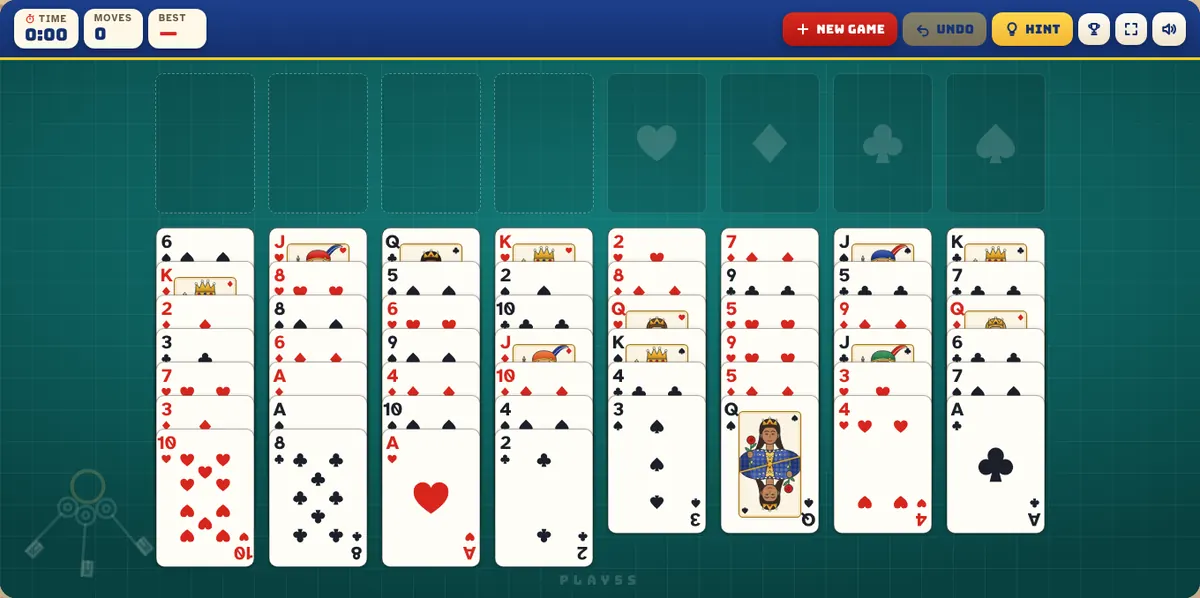
All 52 cards are dealt face up into eight columns: the first four columns get seven cards and the last four get six. Every card is visible from the start, so FreeCell has no stock pile and no hidden cards, and the game is about planning.
Above the columns are two groups of four spaces. The four dashed spaces on the left are the free cells, and each one holds a single card. The four spaces on the right are the foundations, one for each suit.
 Zoom in
Building down the columns
Only the card at the bottom of a column, the one nothing covers, can be played. You can place it on a card that is one rank higher and the opposite color, so a red 7 goes on a black 8, and a black 6 can then go on that red 7. A group of cards in order like this is called a run.
Any card or run can go into an empty column, not only a King. Some computer versions get this wrong and allow only Kings; the Solitaire Laboratory FreeCell FAQ calls that the most common mistake. An empty column is one of the strongest tools in the game.
Using the free cells
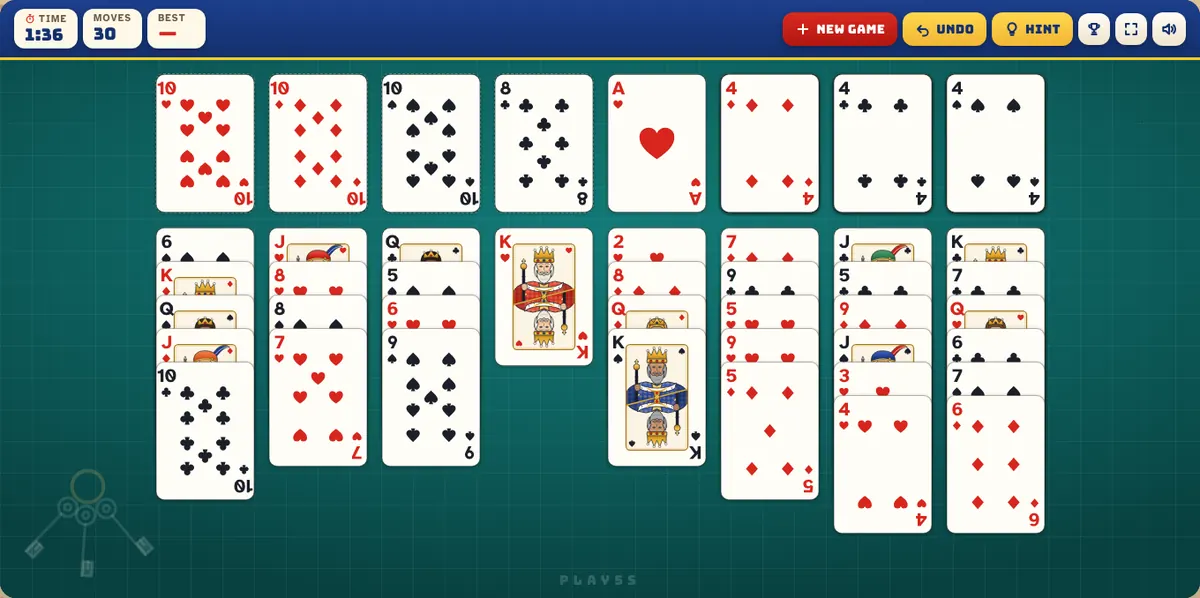
A free cell holds one card, so it is a place to park a card that is in the way: park it, play the card underneath, and bring the parked card back when a spot opens up for it. A game gets hard when all four cells are full, because then every move has to land on a column or a foundation.
 Zoom in
Building the foundations
Each foundation starts with an Ace and grows by suit: Ace, 2, 3 and so on up to King. A card in a free cell or at the bottom of a column can go up whenever it is the next card its suit needs. In the Play5s version a card that has gone up stays there and cannot be moved back down to a column. The Solitaire Laboratory FreeCell FAQ treats that as the standard form of the game and calls moving a card back down worrying back, a variant. Many programs, PySolFC among them, do let you move it back.
 Zoom in
How a game ends
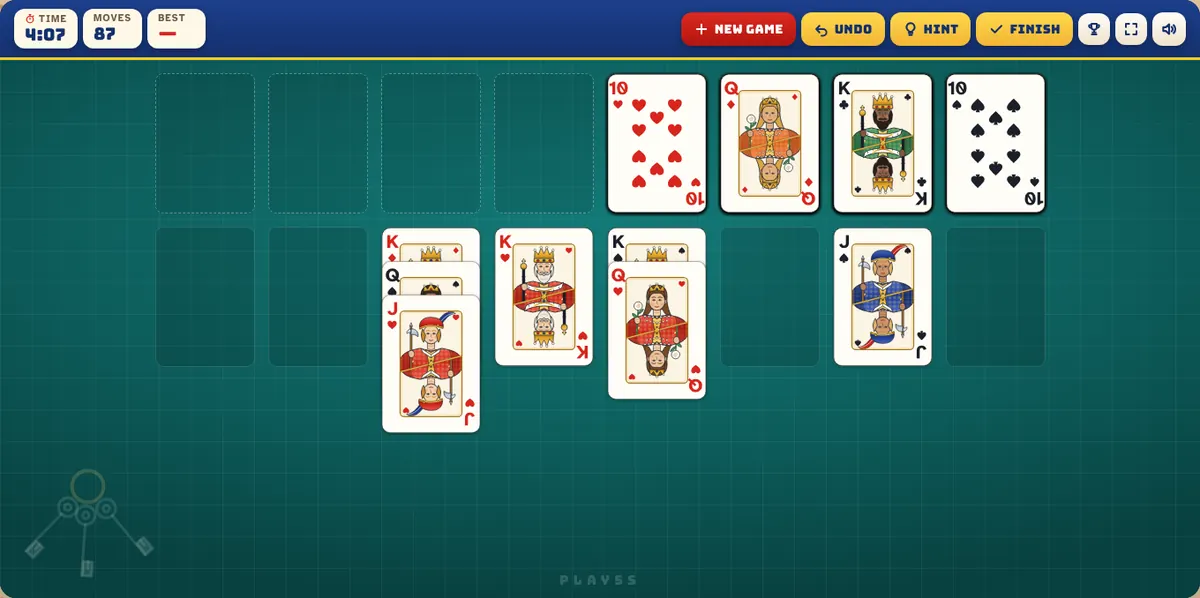
You win when all four foundations hold their suit from Ace to King. Once every remaining card can go up in order, a Finish button appears and sends them to the foundations for you. If no legal move is left, a message appears above the table; press Undo to go back or start a new game.
Moving several cards at once
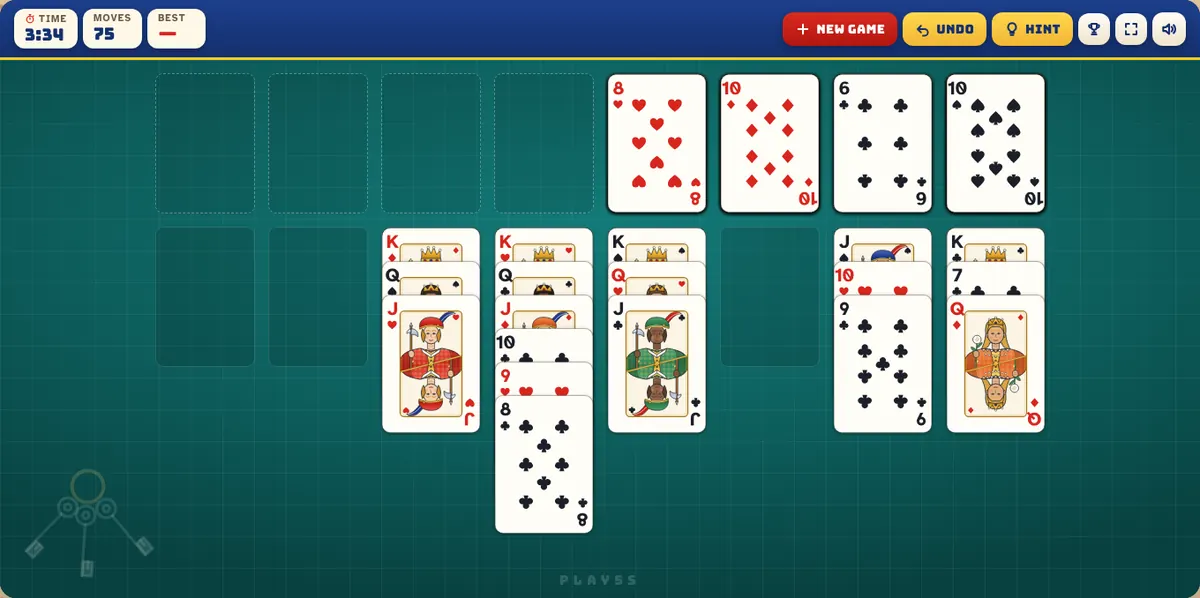
The number of cards you can move at once is the number of empty free cells plus one, doubled for every empty column.
The rules of FreeCell only let you move one card at a time, but a whole run can travel when you have room to shuffle it through the free cells and empty columns. Computer versions usually do this for you in one go (Solitaire Laboratory FreeCell FAQ). In the Play5s version you pick up the run and drop it, and it counts as one move.
With four empty free cells you can move five cards. With two empty cells and one empty column you can move six, because (2 + 1) × 2 = 6. When the run is going into an empty column, that column does not count, so the same table lets you move three. With every cell full and no empty column, you move one card at a time. If a run is too long for the room you have, the move is refused: a tapped card gives a small shake and a dragged run slides back.
 Zoom in
Why empty columns matter
An empty column is worth more than a free cell: it can hold a whole run instead of one card, and it doubles the number of cards you can move. Clearing a column early is one of the strategies in the Solitaire.com FreeCell guide.
Can you win every FreeCell game?
Almost every one: it is estimated that about 99.999% of possible FreeCell deals can be solved.
In 2018, Theodore Pringle and Shlomi Fish found that 102,075 of 8.6 billion deals of the FreeCell Pro program cannot be solved, about one in 84,000 (Shlomi Fish’s report; Wikipedia, “FreeCell”). The best-known deal that cannot be won is number 11982 of the original Microsoft 32,000 numbered deals; every other deal in that set can be won (Solitaire Laboratory FreeCell FAQ).
In the Play5s version each new game is a random shuffle, not a numbered Microsoft deal, and the game does not check it in advance. If you ever feel stuck, the odds are that a way through exists, so try another route with Undo before you give up; just remember that each Undo counts as a move.
Moves, time and best result
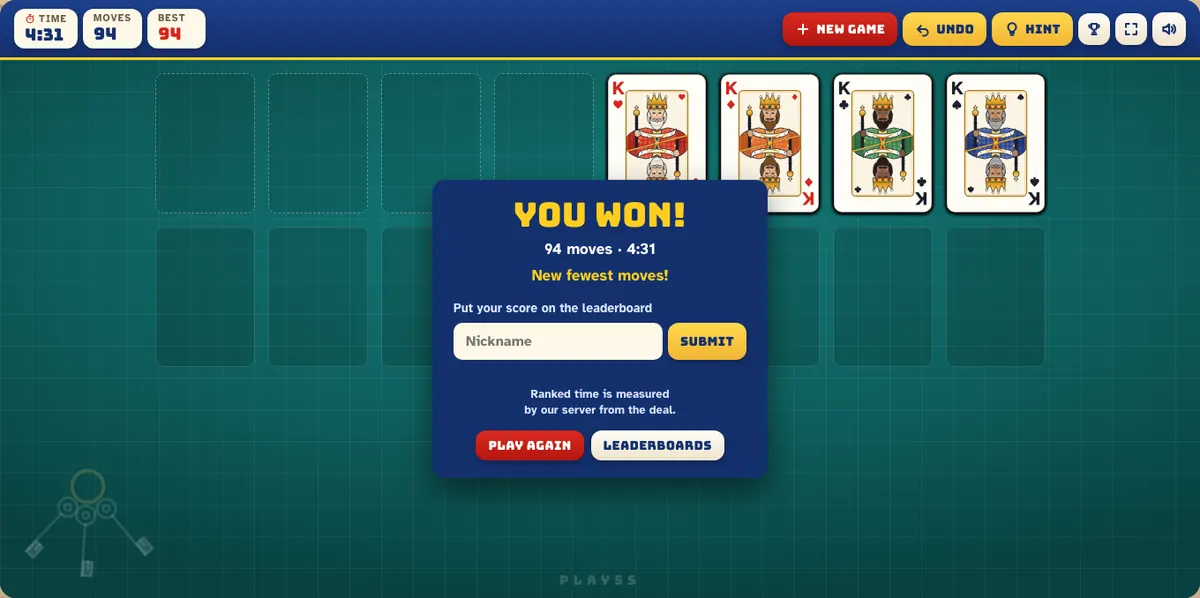
The Play5s version of FreeCell does not use points: it shows your time and your moves and keeps your best result.
The bar above the table shows Time, Moves and Best. Moving a card or a run counts as one move, and so does parking a card in a free cell or sending it to a foundation. Undo puts the table back one move and the Undo itself counts as a move, so the number of moves never goes down: a line you try and take back still counts. The clock stops when you win.
Best is the fewest moves in a game you won. It is kept in your browser and shows a dash until your first win. On the leaderboards, the same number ranks players. Counting moves this way, with a run as one move, is the Play5s way of keeping the tally; other programs may count differently.
 Zoom in
Daily Deal and leaderboards
The Daily Deal is one FreeCell game that every player gets on the same day, and every Daily Deal has a proven win: our solver found a way to win each one before it goes live.
A new Daily Deal starts at midnight New York time. Because everyone plays the same cards, the Daily Deal leaderboard compares every player on one deal: players are ranked by fewest moves, and when moves tie, by less time, then by who posted first. A run you move counts as one move, and so does every Undo: the count never goes down, so a line you try and take back still counts. Our server hands out the Daily Deal, so it needs an internet connection, and each connection gets one ranked result per day: after that you can still replay the deal, but only as practice.
After a win, in the Daily Deal or in a regular game, you can put your result on a leaderboard with a nickname of 2 to 12 characters, no account needed; offensive names are refused. Only games you win can go on a board, and there is one all-time board for regular games next to each day’s Daily Deal board. The server replays every submitted game to check that each move is legal, counts the moves itself and measures the time from its own clock, from the moment the deal is handed out, so a typed-in result or an impossible game is turned away. For regular games the server also picks the deal, so nobody can choose an easy one in advance.
Tips to win more FreeCell games
The best habit in FreeCell is to study the whole deal before the first move, because every card is visible and a plan beats a quick start.
- Find the Aces and 2s first and see what lies on top of them. Digging them out comes before anything else.
- Keep the free cells empty as long as you can: every empty cell adds one card to the run you can move.
- Make an empty column early when it costs only a few moves: it holds a whole run, not just one card.
- Play Aces to the foundations at once, and 2s once their Ace is up. Hold back a higher card if a lower card of the other color might still need to sit on it.
- Before you cover a column, check what is buried in it. A low card trapped under a long run takes a lot of room to dig out.
- Plan two or three moves ahead. Undo has no limit in this version, but every Undo counts as a move, so on the leaderboards a careful plan beats trial and error.
- When you are stuck, press Hint. It highlights a card and the spot it can go to.
FreeCell controls: tap, drag or keyboard
Tap a card to send it to the best place it can go, or drag it to the exact spot you want.
A tap sends a card to its foundation when it fits there, otherwise onto a column that accepts it, otherwise into a free cell, and as a last resort into an empty column. A card that is alone in its column is only sent to a foundation or onto a column, never to a free cell or an empty column, because that would only swap one empty space for another; drag it if you want it in a free cell or an empty column. Tapping a card in the middle of a column picks it up together with the run below it. If a card has nowhere to go, it gives a small shake.
Dragging works with a mouse, a finger or a stylus. Drop the card or run near the place you want; the game picks the closest spot that accepts it, and if none does the cards slide back.
Buttons
New game deals a fresh shuffle and asks first when a game is in progress; Escape keeps playing. Undo takes back your last move and has no limit: you can press it all the way back to the deal, and it still works after you close and reopen the page. Each Undo counts as a move, so the Moves count never goes down. Hint highlights a useful move and where it can go. Finish appears when every card left can go straight to the foundations. In the Play5s version no card moves by itself: many programs play safe cards to the foundations automatically (Solitaire Laboratory FreeCell FAQ), while here only a tap or the Finish button does it. The trophy button opens the leaderboards. The full screen button hides everything except the table; press it again, or Esc, to come back. The gear (Settings) button opens a panel with two switches: sound effects for dealing, moving and winning (on at first) and a quiet background music loop (off until you turn it on); both choices are remembered for every Play5s game. The same panel lets you pick the language of the game’s own words, and the M key mutes or unmutes the sound effects.
Keyboard shortcuts
On a computer you can play without the mouse. The table is one stop for the Tab key: Tab and Shift+Tab (or the arrow keys) walk through the cards you can pick up, from free cell 1 to 4 and then column 1 to 8, top to bottom. Press Enter or Space to select a card, or the run below it. Then the arrow keys step through the places that accept it, free cells, foundations and columns, empty ones included, and Enter places it there. Escape cancels. Pressing Enter a second time on the selected card moves it for you.
- U or Ctrl+Z: undo
- H: show a hint
- N: start a new game (asks first when a game is in progress)
- F: full screen on or off
- Esc: leave full screen
- M: sound effects on or off
FreeCell terms
FreeCell uses a few words for the parts of the table, and most of them are the same in other solitaire games.
- Column: one of the eight piles where most of the game is played. Also called a cascade or tableau.
- Free cell: one of the four spaces that holds a single card.
- Foundation: one of the four piles, one per suit, built from Ace to King. Also called a home cell.
- Run: a sequence of cards in descending order and alternating colors.
- Supermove: moving a whole run in one go, which the rules allow only when enough free cells and empty columns are available.
- Empty column: a column with no cards, which accepts any card or run.
Where FreeCell comes from
FreeCell was created by Paul Alfille in 1978 for the PLATO educational computer system, while he was a medical student at the University of Illinois.
Alfille changed an older game, Baker’s Game, which Martin Gardner described in his June 1968 Scientific American column and in which columns are built by suit. By letting columns build down in alternating colors instead, he made nearly every deal winnable (Wikipedia, “FreeCell”; Solitaire Laboratory FreeCell FAQ).
FreeCell stayed fairly obscure until Microsoft released it as part of Windows 95. Windows 8 did not include it, and it was offered there as a free download in the Microsoft Solitaire Collection, which is bundled with Windows 10 (Wikipedia, “Microsoft FreeCell”). The original Windows version came with 32,000 numbered deals, so players could compare notes on the same hand (Solitaire Laboratory FreeCell FAQ).
Sources
The rules and facts on this page come from these references, all read on 21 November 2026.
FreeCell questions
Can every game of FreeCell be won?
Almost every one. It is estimated that about 99.999% of possible deals can be solved, and about one random deal in 84,000 cannot (Wikipedia, “FreeCell”). The best-known unwinnable deal is number 11982 of the Microsoft 32,000.
How many cards can I move at once in FreeCell?
The number of empty free cells plus one, doubled for every empty column. With four empty cells you can move five cards; with two empty cells and one empty column you can move six. Into an empty column, that column does not count.
Can any card go into an empty column?
Yes. Any card or run of cards can fill an empty column in FreeCell, not only a King.
Can I move a card back down from a foundation?
Not in this version. The Solitaire Laboratory FreeCell FAQ describes the standard form of FreeCell as one where cards that have gone to the foundations stay there, and Play5s follows that. Many programs, PySolFC among them, do let you move them back; the FAQ calls that worrying back, a variant.
What is the difference between FreeCell and Klondike?
In FreeCell all cards are dealt face up and very few deals are unsolvable, which sets it apart from most solitaire games (Wikipedia, “FreeCell”). Klondike deals some cards face down and keeps a stock pile that you turn over; FreeCell has neither.
Does the game save my progress?
Yes. Your current game, moves, time and Undo history are saved in this browser on this device, so you can close the page and pick up where you left off. Clearing your browser data removes the saved game.
How does scoring work in FreeCell?
The Play5s version does not use points. It shows your time and your moves, and Best is the fewest moves in a game you won. A card or run you move counts as one move, and so does every Undo, so the count never goes down.
Can I play FreeCell on my phone?
Yes. The table fits phone screens in portrait mode. Tap a card to move it automatically, or drag it with your finger.
What is the Daily Deal?
A FreeCell game that is the same for every player on a given day, so you can compare your result with everyone else. Our solver has found a way to win every Daily Deal. A new one starts at midnight New York time. It needs an internet connection, and each connection gets one ranked result per day; after that you can replay it for practice.
Is there a FreeCell leaderboard?
Yes. There is a leaderboard for each Daily Deal and an all-time leaderboard for regular games, ranked by fewest moves, with less time breaking a tie. After a win, type a nickname and press Submit; no sign-up is needed. The time on the leaderboard is measured by our server from the moment the deal is handed out.
Is FreeCell free on Play5s?
Yes. It is free to play in your browser, with no download and no account.
About this version
This FreeCell Solitaire was built by Play5s to run in any modern web browser. It follows the standard rules above, including that cards on a foundation stay there, and deals a new shuffled hand every game. Two choices are Play5s’s own: a run you move counts as one move, and so does every Undo. The cards, including the Jacks, Queens and Kings, are drawn by Play5s.
There is nothing to install and no account to create. Your game in progress and your best result are kept in your browser on this device. Starting a ranked game asks our server for a deal and a ticket; your moves and nickname are sent only when you submit a result to a leaderboard.
Read more about Play5s, or see all of our free solitaire games.