

On this page
How to play Scorpion Solitaire
To win Scorpion Solitaire, build four columns that each run from King down to Ace in a single suit.
The setup
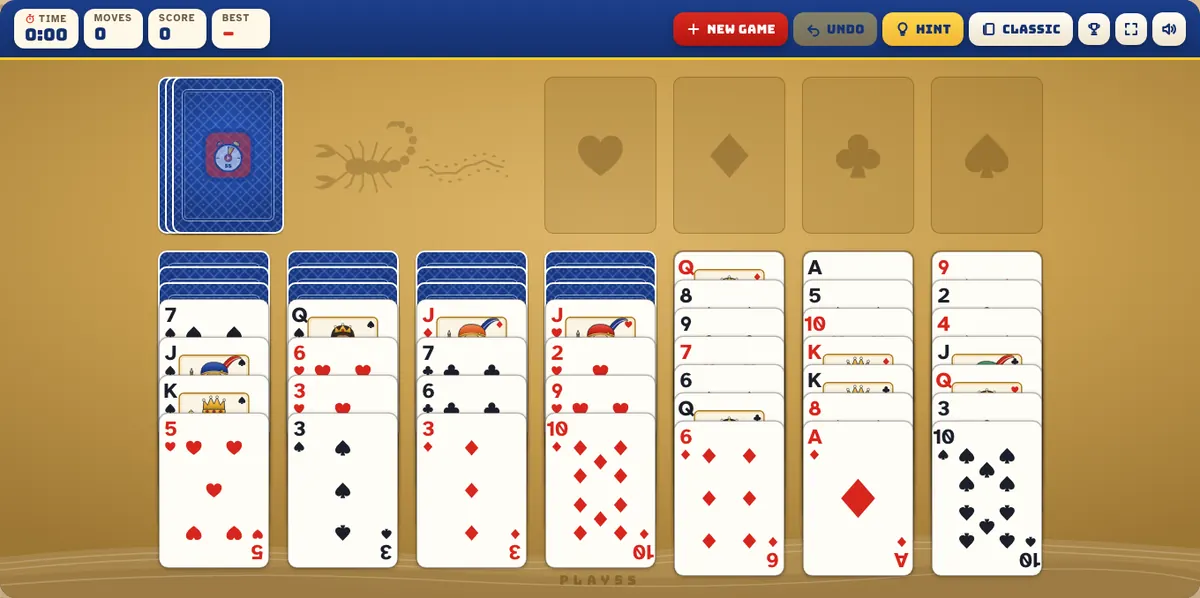
The game starts with 49 cards dealt into seven columns of seven cards. In the first four columns the bottom three cards are face down and four cards lie face up on top of them. The last three columns are face up from the first card to the last.
The three cards left over form the reserve, which waits in the top left corner. That makes 12 face-down cards in all, three in each of the first four columns. The four marks at the top right are not piles: no cards go on them, they only light up when a suit is finished.
 Zoom in
Moving cards
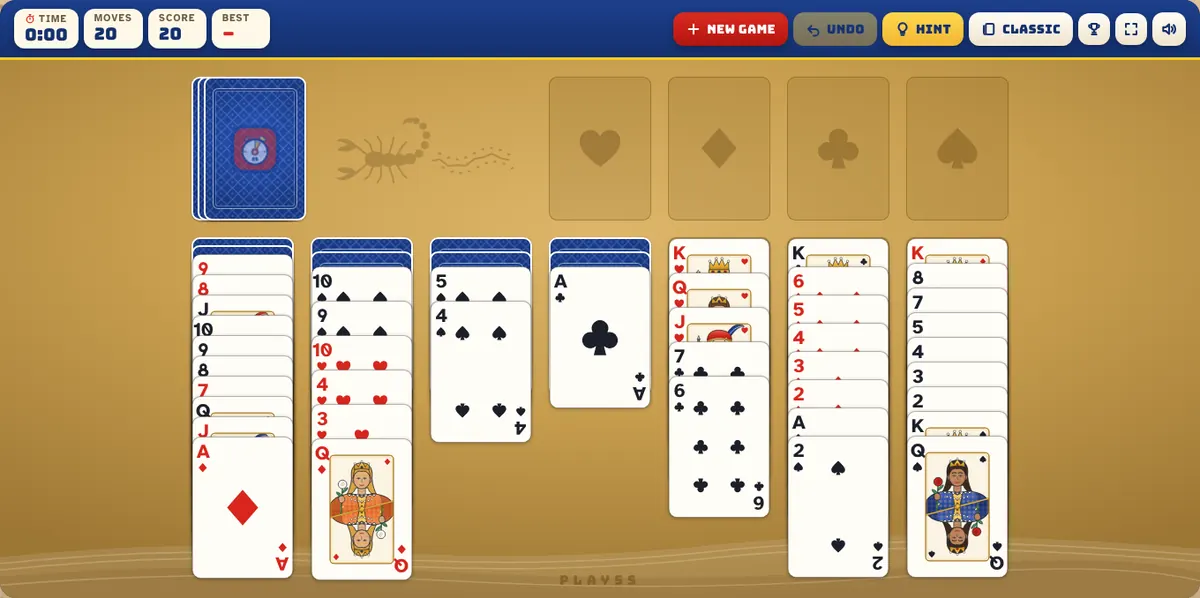
You build down in a single suit, one rank at a time: a 6 of hearts goes on a 7 of hearts, and nothing can be placed on an Ace. Every face-up card is available to move, wherever it sits in a column, and it takes all the cards on top of it along as one unit.
The cards on top do not have to be in order. Only the card you pick up has to fit on the card you move it onto. When a move uncovers a face-down card, that card turns face up.
 Zoom in
Empty columns
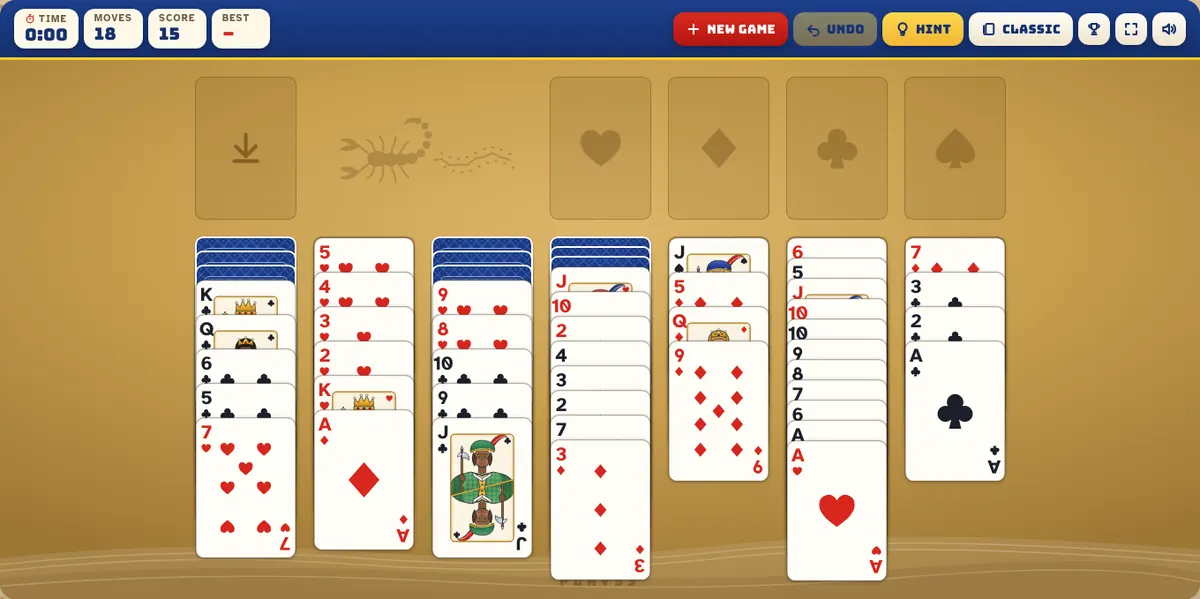
In Classic mode an empty column can only be filled by a King, or by a run that starts with a King. A King cannot be moved onto another card, so it moves only into an empty column. Moving a King that already sits at the bottom of its column into another empty column changes nothing, so the game does not allow it.
The reserve
When you tap the reserve, its three cards are dealt face up, one on each of the first three columns. This happens once per game: there is no second deal.
Wikipedia, PySol FC, BVS Solitaire and SolSuite all deal the reserve once no more moves are possible, and solitaire.gg advises using it when you get stuck. In the Play5s version you can deal it whenever you like. The BVS Solitaire strategy notes still advise waiting, because the new cards may cover face-down ones.
 Zoom in
How a game ends
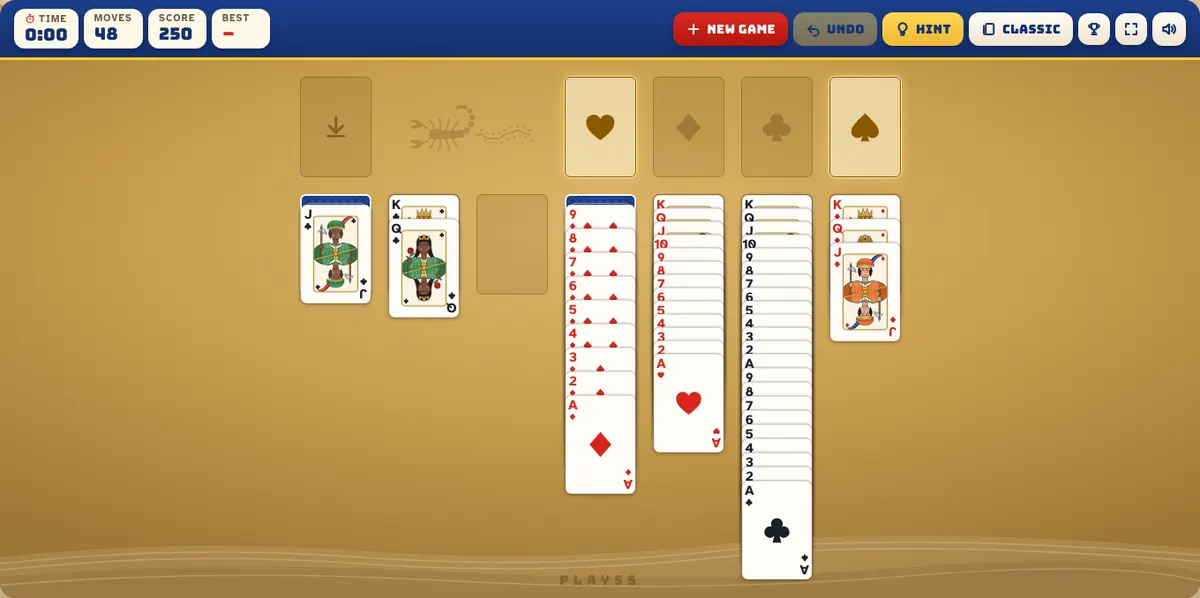
You win when all four suits are built from King down to Ace. In the Play5s version a finished suit stays in its column, and its mark at the top right lights up. Wikipedia and BVS Solitaire keep finished suits on the table too, while PySol FC, SolSuite and solitaire.gg move a completed suit off the table.
A suit counts as finished as soon as its 13 cards are in order in one column, even if a reserve card is later dealt onto its Ace. Wikipedia adds a rule of thumb: once a column is built from King to Ace, leave it alone unless it covers a face-down card. If no move is left and the reserve is used, Undo takes you back (never past the reserve deal), or you can start a new game.
 Zoom in
Classic or Easy?
Classic follows the usual Scorpion rule that only a King can fill an empty column, and Easy lets any card or run fill one.
Easy uses the rule of the Wasp variant described on Wikipedia: when a space opens in the tableau, any card or sequence can be placed in it, which gives the player more chances of winning than the standard rule. Everything else is the same in both modes: the deal, the building rule, the reserve and the scoring.
Best is kept separately for each mode and counts the fewest moves in a won game, and each mode has its own leaderboard. The mode button in the bar above the table switches mode and starts a new game. The Daily Deal is always played in Classic mode. If you are new to Scorpion, Easy is the gentler place to start.
How scoring works in Scorpion
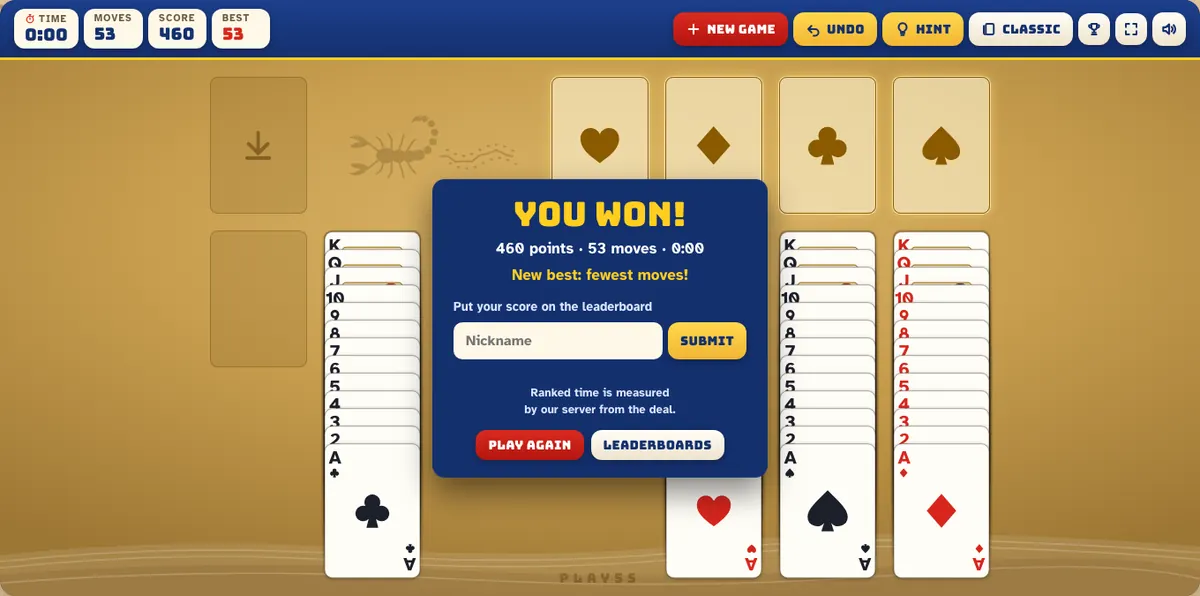
Play5s scoring gives 5 points for every face-down card you turn over and 100 points for every suit you finish from King down to Ace, so the score shows how far the game has come.
This is the Play5s scoring for this game, not a scale taken from another game. The score runs from 0 up to 460: 12 face-down cards at 5 points each, plus four suits at 100 points each. Moving cards between columns scores nothing by itself, and dealing the reserve scores nothing unless one of its cards finishes a suit. If you break up a finished suit by moving cards out of it, you lose its 100 points again. There is no time bonus and no penalty for Hint. Undo puts the board and the score back to what they were before the move it takes back.
A win ends on 460 unless a suit was finished on top of face-down cards that were never turned over; each such card leaves its 5 points unclaimed. Because the score hardly tells one win from another, Best, and the leaderboards, count something else: the fewest moves in a won game, kept for each mode. Every action counts as one move: each card move, the reserve deal and each Undo. A move you take back still counts, and so does the Undo, so Moves never goes down.
 Zoom in
Daily Deal and leaderboards
The Daily Deal is one Classic game that every player gets on the same day, and the leaderboards rank won games by the fewest moves.
A new Daily Deal starts at midnight New York time, and everyone plays the same cards. A solver found a way to win every Daily Deal. It could see the face-down cards and the order of the reserve; you cannot, so not every player will win it. Our server hands out the Daily Deal, so it needs an internet connection, and each connection gets one ranked result per day: after that you can still replay the deal, but only as practice.
Only won games go on a leaderboard. Players are ranked by the fewest moves, and every action counts as a move, Undo included, so taking moves back and trying again cannot lower your count. When two players have the same number of moves, the faster time ranks higher, and then whoever posted first. There is a Daily Deal board for today's deal and an all-time board for each mode, Classic and Easy. After a win you can put your result on a board with a nickname of 2 to 12 characters, no account needed, and offensive names are refused.
The server replays every submitted game move by move to check it, counts the moves itself and measures the time from its own clock, from the moment it hands out the deal. For regular games the server also picks the deal. Starting a ranked game asks our server for a deal and a ticket; your moves and nickname are sent only when you submit a result.
Scorpion rules that differ between versions
The rule pages this article is based on agree on the deal, on building down in suit and on Kings alone filling an empty column; they differ on whether a finished suit stays on the table and on how strictly the reserve has to wait.
The pages are Wikipedia's Scorpion article, the PySol FC rules, the BVS Solitaire rules, the SolSuite rules and the solitaire.gg rules, read on November 21, 2026, together with the PySolFC game code. The Play5s version follows them except in the ways listed here.
- Finished suits: Wikipedia and BVS Solitaire keep a finished suit on the table; PySol FC, SolSuite and solitaire.gg move it off the table. In the Play5s version it stays in its column.
- Reserve timing: Wikipedia, PySol FC, BVS Solitaire and SolSuite deal the reserve once no more moves are possible; solitaire.gg advises using it when you get stuck and sets no condition, and the PySolFC game code lets you deal it at any time. In the Play5s version you can deal it at any time.
- Empty columns: all five pages allow only a King, or a run that starts with a King, and Classic mode does the same. Easy mode lets any card or run fill an empty column, as the Wasp variant on Wikipedia does.
- Face-down cards: in the Play5s version they are in the first four columns. Wikipedia describes a variant called Scorpion II with them in the first three columns and calls it easier than the regular game.
Tips to win more Scorpion games
The most useful habit in Scorpion is to uncover face-down cards early, because every hidden card is a card you cannot plan with.
- Avoid covering a face-down card unless the move builds a key sequence.
- Build long same-suit runs and start them from Kings.
- Keep empty columns for moves that matter, such as freeing a trapped low card, instead of filling them with the first King you see.
- Leave a finished King-to-Ace column alone unless it covers a face-down card.
- Deal the reserve last: its three cards can land on face-down cards or on a run you were building.
- Before you move, look through every column for low cards and protect them.
- Keep the four suits moving at a similar pace so that no suit is left stuck behind the others.
- Think before you take a move back: in this version every Undo counts as a move, and so does the move it takes back, so a game that wanders and returns ranks lower than a clean one.
Scorpion compared with Yukon, Spider and Spiderette
Scorpion belongs to the Spider family of solitaire games, but the way you move cards is akin to Yukon.
That is how Wikipedia describes it: somewhat related to Spider, with a method of play akin to Yukon. PySol FC calls Scorpion an interesting combination of Spider-type and Yukon-type elements, with an object like Spiderette but cards that move as in Russian Solitaire.
In Scorpion, what you pick up is any face-up card together with everything on top of it, and what you build is a single suit from King down to Ace inside the seven columns, with no separate piles to send suits to in the Play5s version. For a different solitaire to try, Klondike Solitaire is playable on Play5s too.
Scorpion controls: tap, drag or keyboard
Tap a card to send it to the card it belongs on, or drag it to the exact column you want.
A tap moves the card, and every card on top of it, onto the card it fits on. If it fits nowhere, it gives a small shake. A tap sends a card into an empty column only when that turns a face-down card over, or when the card is a King; in Easy mode, to put any other card into a gap, drag it there or pick it up with the keyboard.
Dragging works with a mouse, a finger or a stylus. Drop the card or run near the column you want; if the move is not allowed, the cards slide back. Tapping the reserve deals its three cards.
Buttons
Undo takes back your last move, and you can keep pressing it to go back further, but never past the reserve deal: a deal cannot be taken back, and the table says so. Each Undo counts as a move and the move it takes back still counts, so Moves never goes down. Undo still works after you reload the page. Hint highlights the cards of a useful move, or the reserve when no column move is worth making. New game deals a fresh hand in the same mode, and the mode button switches between Classic and Easy and starts a new game; both ask first while a game is in progress, so a slip of the finger cannot throw it away, and Escape keeps the game. The cup button opens the leaderboards. The full screen button hides everything except the table; press it again, or Esc, to come back. The gear (Settings) button opens a panel with two switches: sound effects for dealing, moving and finishing a suit (on at first) and a quiet background music loop (off until you turn it on); both choices are remembered for every Play5s game. The same panel lets you pick the language of the game’s own words, and the M key mutes or unmutes the sound effects.
The bar above the cards shows your time, moves, score and Best, your own fewest moves in a won game on this device. The clock starts with your first move and stops while the start screen is open. Dealing the reserve counts as one move. The Daily Deal button on the start screen starts today's deal.
Keyboard
On a computer you can play without the mouse, in both modes. Press Tab to walk through the playable cards by position: the reserve first, then column 1 to 7, each from the top down. The arrow keys also move up and down inside a column and left and right between columns.
Press Enter or Space on a card to pick it up together with the cards on top of it. The place it belongs on lights up; the arrow keys, or Tab, step through every other place it may legally go, including empty columns in Easy mode. Enter puts the card down, Escape lets go. On the reserve, Enter deals it.
- Tab, Shift+Tab or the arrow keys: move between the playable cards
- Enter or Space: pick a card up, then put it down on the lit place; Escape lets go
- D: deal the reserve
- U or Ctrl+Z: undo
- H: show a hint
- N: start a new game (asks first while a game is in progress)
- F: full screen on or off, Esc leaves full screen
- M: sound effects on or off
Scorpion terms
Scorpion uses a few words for the parts of the table, and different rule pages name some of them differently.
- Column: one of the seven stacks of cards where the whole game is played.
- Reserve: the three leftover cards waiting in the top left corner. PySol FC calls this pile the talon.
- Run: cards in a column that follow each other downward in one suit, such as the Queen, Jack and 10 of hearts.
- Face down and face up: only face-up cards can be moved; a face-down card turns over when the card on top of it leaves.
- Gap: a column with no cards left, which can be filled by a King, or by any card in Easy mode.
- Finished suit: a run from King down to Ace in one suit. Four of them win the game.
Scorpion variants and relatives
Wikipedia lists three named variants of Scorpion: Scorpion II, Wasp and Three Blind Mice.
Scorpion II has the three face-down cards in the first three columns instead of the first four, which Wikipedia says makes it easier than regular Scorpion. Wasp is almost identical to Scorpion except that any card or sequence can fill a gap, and Wikipedia says this gives the player more chances of winning.
Three Blind Mice starts with ten columns of five cards. The three rightmost columns have three face-down cards and two face-up cards, the rest are face up, and the two leftover cards are set aside face up to use whenever necessary. The Play5s version offers the standard rule as Classic and the Wasp rule as Easy.
Scorpion questions
What is the goal of Scorpion Solitaire, and how is it dealt?
To build four columns, one per suit, that each run from King down to Ace; in the Play5s version they stay on the table, and the game is won when all four are finished. 49 cards go into seven columns of seven: the first four columns have three face-down cards at the bottom and four face-up cards on top, the last three columns are all face up, and the remaining three cards are the reserve.
Which cards can I move in Scorpion?
Any face-up card, wherever it is in its column, together with all the cards on top of it. It has to fit on a card of the same suit that is one rank higher. The cards on top of it do not have to be in order, and nothing can be placed on an Ace.
Which cards can go into an empty column?
In Classic mode only a King, or a run that starts with a King, as in all five rule pages this article uses. In Easy mode any card or run can, which is the rule of the Wasp variant.
How does the reserve work?
Tapping it deals its three cards face up, one on each of the first three columns, and it can only be dealt once. Wikipedia, PySol FC, BVS Solitaire and SolSuite deal it once no more moves are possible; in the Play5s version you can deal it at any time.
Does a finished suit leave the table?
Not in the Play5s version, where a finished suit stays in its column and its mark lights up. Wikipedia and BVS Solitaire also keep it on the table, while PySol FC, SolSuite and solitaire.gg move a completed suit off the table.
How does scoring work in Scorpion?
This is Play5s scoring: 5 points for turning over a face-down card and 100 points for each suit finished from King down to Ace, so the score shows how far you got and a win normally ends on 460. Best and the leaderboards count the fewest moves in a won game instead, and every action counts, Undo included. Breaking up a finished suit takes its 100 points back.
What is the Scorpion Daily Deal?
A Classic game that is the same for every player on a given day, so you can compare your result with everyone else. A solver found a way to win every Daily Deal, but it could see the face-down cards and you cannot. A new one starts at midnight New York time, and each connection gets one ranked result per day.
Is there a Scorpion leaderboard?
Yes: one board for each Daily Deal and an all-time board for Classic and for Easy, ranked by the fewest moves in a won game, then by time. After a win, type a nickname and press Submit; no sign-up is needed.
Does the game save my progress?
Yes. Your current game, moves and time are saved in this browser on this device, so you can close the page and pick up where you left off. Your best results are kept there too. Clearing your browser data removes them.
Is Scorpion Solitaire hard to win?
BVS Solitaire's strategy notes say the win rate is low because of the face-down cards and the building by suit. Easy mode gives you more chances. Hint is free to use as often as you like, and so is Undo, except that every Undo counts as a move.
Is Scorpion free on Play5s, and does it work on a phone?
Yes to both. It is free to play in your browser with no download and no account, and the table fits phone screens in portrait and landscape. Tap a card to move it, or drag it with your finger.
About this version
This Scorpion Solitaire was built by Play5s to run in any modern web browser. It deals a new shuffled hand every game and lets you choose Classic or Easy. The cards, including the Jacks, Queens and Kings, are drawn by Play5s.
There is nothing to install and no account to create. Your game in progress and your best results are kept in your browser on this device. Starting a ranked game asks our server for a deal and a ticket; your moves and nickname are sent only when you submit a result to a leaderboard. The rules on this page come from Wikipedia's Scorpion article and the PySol FC, BVS Solitaire, SolSuite and solitaire.gg rule pages, read on November 21, 2026; where the Play5s version differs, this page says so.
Read more about Play5s, or see all of our free solitaire games.